| title | Viewing code scanning logs from GitHub Actions | ||||||
|---|---|---|---|---|---|---|---|
| intro | View the output from a {% data variables.product.prodname_code_scanning %} analysis in {% data variables.product.prodname_actions %}. | ||||||
| permissions | {% data reusables.permissions.code-scanning-pr-alerts %} | ||||||
| redirect_from |
|
||||||
| versions |
|
||||||
| contentType | how-tos | ||||||
| shortTitle | View code scanning logs | ||||||
| category |
|
{% data reusables.code-scanning.enterprise-enable-code-scanning-actions %}
After configuring {% data variables.product.prodname_code_scanning %} using default setup or a custom {% data variables.product.prodname_actions %} workflow, you can watch the output of the actions as they run. For information about logs for other {% data variables.product.prodname_code_scanning %} setups, see AUTOTITLE.
{% data reusables.repositories.actions-tab %}
You'll see a list that includes an entry for running the {% data variables.product.prodname_code_scanning %} workflow. The text of the entry is the title you gave your commit message.

-
Click the entry for the {% data variables.product.prodname_code_scanning %} workflow.
[!NOTE] If you are looking for the {% data variables.product.prodname_codeql %} workflow run triggered by enabling default setup, the text of the entry is "{% data variables.product.prodname_codeql %}."
-
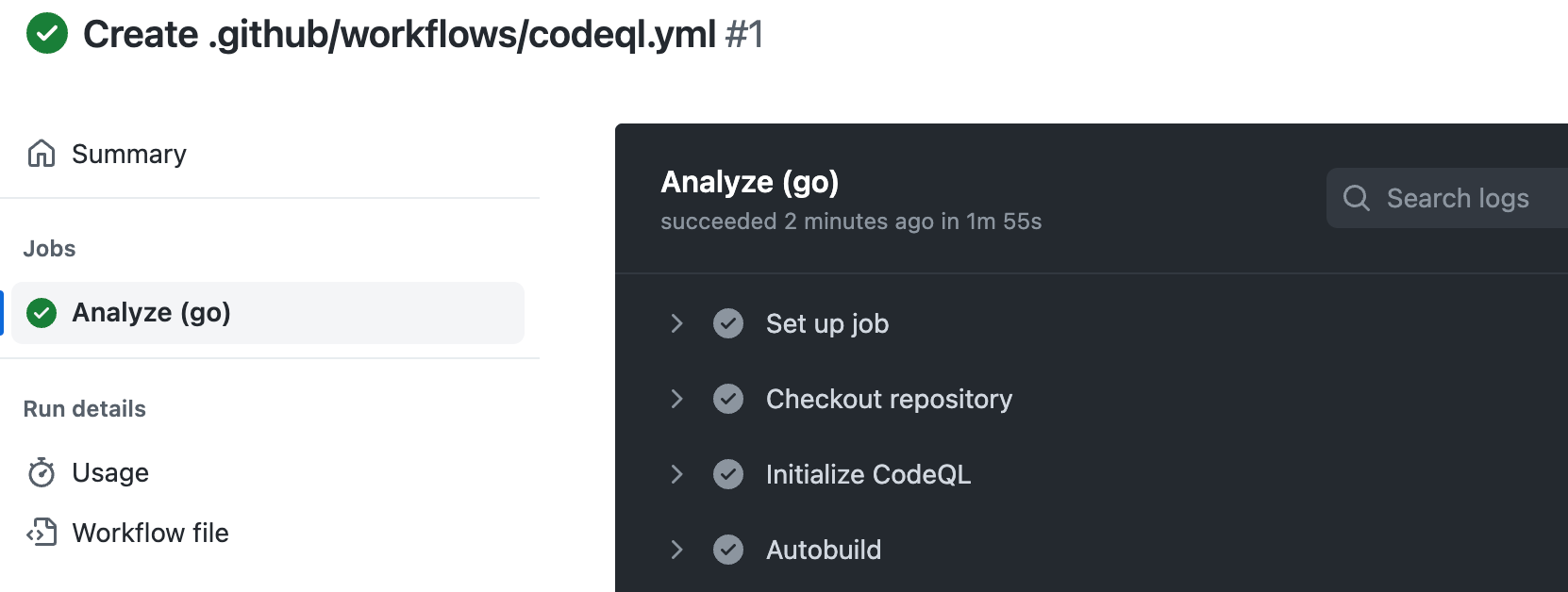
Click the job name on the left. For example, Analyze (LANGUAGE).
-
Review the logging output from the actions in this workflow as they run.
-
Optionally, to see more detail about the commit that triggered the workflow run, click the short commit hash. The short commit hash is 7 lowercase characters immediately following the commit author's username.
-
Once all jobs are complete, you can view the details of any {% data variables.product.prodname_code_scanning %} alerts that were identified. For more information, see AUTOTITLE.

If you're looking for diagnostic information about whether {% data variables.product.prodname_code_scanning %} accessed any private registries, see AUTOTITLE.